> ## Documentation Index
> Fetch the complete documentation index at: https://docs.winningvariant.com/llms.txt
> Use this file to discover all available pages before exploring further.
# Python SDK
> Run split tests with less friction directly in Python.
The Winning Variant Python SDK is currently in Public Preview. If you notice any issues with the SDK, please report issues to your Winning Variant account team.
The Winning Variant Python SDK makes it easier to implement split tests directly in your python applicatios, AI/ML workloads, or Streamlit apps. It uses an existing Winning Variant Snowflake Native App installation, accessed via a `session` object provided to the client.
## Installation
### General Installation
Install the SDK by running the following:
`pip install winningvariant`
### Import into Snowflake UDFs and procedures using Artifact Registry
The [Snowflake Artifact Registry](https://docs.snowflake.com/en/developer-guide/udf/python/udf-python-packages#artifact-repository-overview) allows you to directly use Python packages from the Python Package Index (PyPI) within Snowpark Python user-defined functions (UDFs) and stored procedures.
Follow the instructions in the linked article to use the `winningvariant` package.
### Use in Snowflake Notebooks / Worksheets
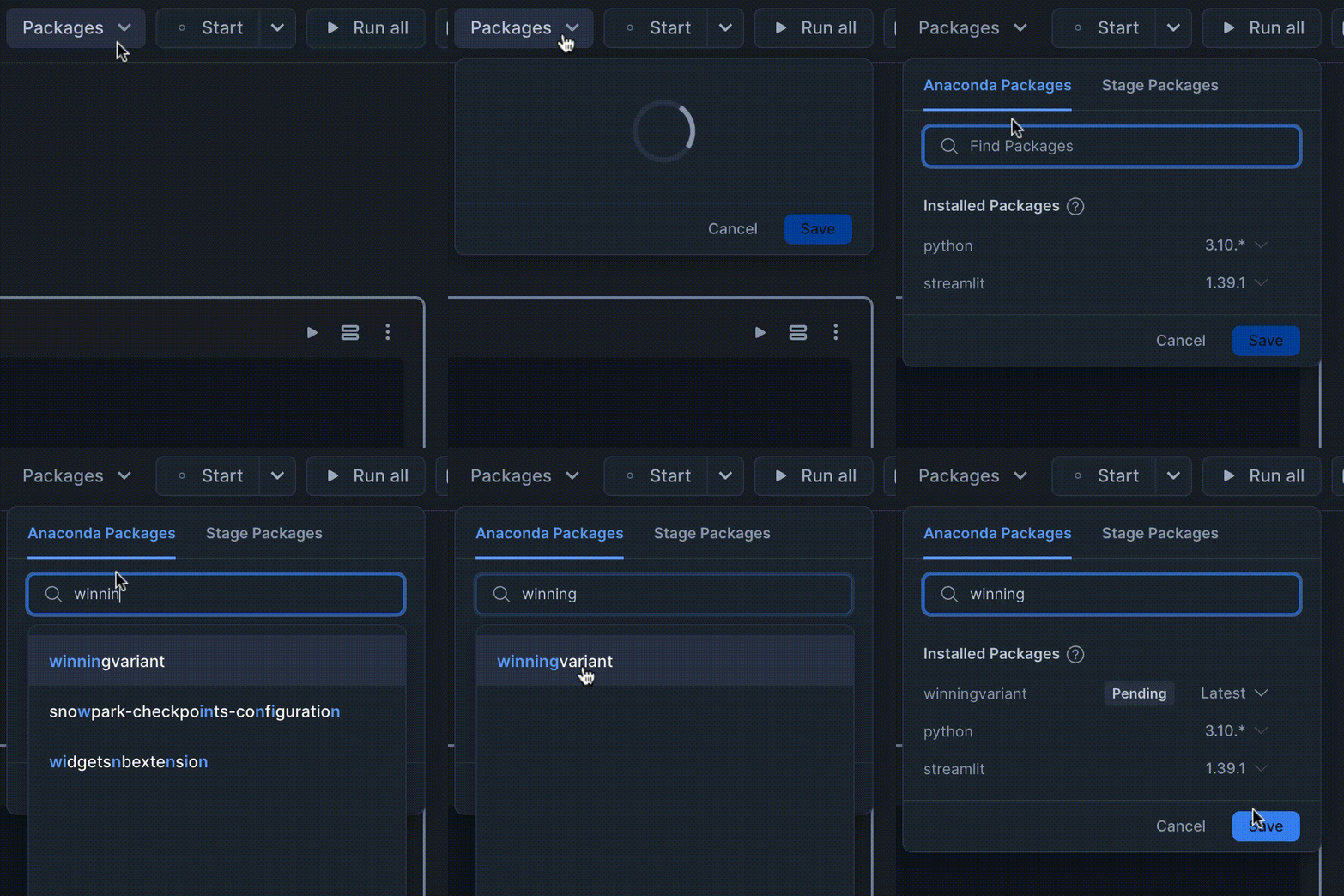
Within a notebook or worksheet, select **Packages** and add the `winningvariant` package.
 ## Initialization
To initialize the SDK, import the object and inintialize it using a Snowflake Snowpark `session` object:
```python theme={null}
from winningvariant import WinningVariantClient
from snowflake.snowpark import Session
connection_parameters = {
"user": "",
"password": "",
"account": "",
"warehouse": "",
"database": ""
}
session = Session.builder.configs(connection_parameters).create()
wv = WinningVariantClient(session)
```
### Options
The following intializing parameters are available:
| **Parameter** | **Description** |
| ------------- | ------------------------------------------------------------------------------------------- |
| `session` | The `snowflake.snowpark` session to use to access the Winning Variant Snowflake Native App. |
| `cache` | (Default: `True`) If `True`, enables local caching of assignments as they're read/created. |
The user defined in the `session` must have one of the following [application roles](https://docs.winningvariant.com/snowflake-app-details#application-roles):
* `admin`
* `editor`
* `scientist`
**Caching**
Caching can be enabled/disabled after client initialization by calling `wv.enable_cache()` or `wv.disable_cache()`, respectively.
## Assignment Object
The SDK includes an `Assignment` object that is used to identify the ID of a variant that a subject is assigned within an experiment. [Read more here](/assignments/overview).
The Assignment object includes a reference to the `subject_id`, `experiment_id`, and the `variant` it's assigned to.
### Assignment Comparison
To test if an assignment is for a given variant, you can call `is_variant("")` or do a string comparison:
```python theme={null}
if assignment.is_variant("control"):
print("Control group")
if assignment == "control":
print("Also control group")
```
## Assignment Management
The SDK provides various ways to get/create experiment assignments based on your needs.
### Get Assignment
This read-only method gets an existing assignment for a subject ID inside of an experiment. If none exists, it will **not** be created.
```python theme={null}
.get_assignment(subject_id="...", experiment_id="...")
```
| **Parameter** | **Description** | **Type** |
| --------------- | -------------------------------------------------------- | -------- |
| `subject_id` | (**Required**) ID of the subject used in the experiment. | `string` |
| `experiment_id` | (**Required**) ID of the experiment. | `string` |
Returns an [Assignment](#assignment-object) object if one exists, otherwise `None`.
```python Example theme={null}
assignment = wv.get_assignment(subject_id="user_123", experiment_id="my-exp")
if assignment == None:
print("No assignment for this subject")
elif assignment == "TREATMENT":
print("Subject is in the treatment group")
elif assignment == "CONTROL":
print("Subject is in the control group")
```
### Get or Create Assignment
Gets an assignment if one exists, otherwise it creates a new one according to the experiment definition.
```python theme={null}
.create_assignment(subject_id="...", experiment_id="...")
```
| **Parameter** | **Description** | **Type** |
| :-------------- | :------------------------------------------------------- | :------- |
| `subject_id` | (**Required**) ID of the subject used in the experiment. | `string` |
| `experiment_id` | (**Required**) ID of the experiment. | `string` |
Returns an [Assignment](#assignment-object) object upon success, `None` if something went wrong.
```python Example theme={null}
assignment = wv.create_assignment(subject_id="user_123", experiment_id="my-exp")
if assignment == "TREATMENT":
print("Subject is in the treatment group")
elif assignment == "CONTROL":
print("Subject is in the control group")
else:
print("Something went wrong")
```
### Check if a subject has a specific assignment with an experiment
If you have a subject for which you want to do a quick check to see if they have a particular assignment or not, you can use the shorthand `check_variant` function. A good use case for this would be in 2-variant A/B tests or feature flag scenarios where you want to quickly check if a subject is in the treatment group.
```python theme={null}
.check_variant(subject_id="...", experiment_id="...", variant_id="...")
```
| **Parameter** | **Description** | **Type** |
| :------------------ | :------------------------------------------------------------------------------ | :------- |
| `subject_id` | (**Required**) ID of the subject used in the experiment. | `string` |
| `experiment_id` | (**Required**) ID of the experiment. | `string` |
| `variant_id` | (\*\*Required) \*\*ID of the variant to check. | `string` |
| `create_assignment` | (Default: True) If set, an assignment wll be made if one doesn't already exist. | `bool` |
Returns a boolean indicating if the subject has the given assignment in the experiment.
```python Example theme={null}
is_treatment = wv.check_variant(subject_id="user_123", experiment_id="my-exp", variant_id="treatment")
if is_treatment:
print("In the treatment group")
else:
print("Not in the treatment group")
```
## Decorators
The SDK provides a number of function decorators to provide optionality in how you implement split tests in our codebase.
Each decorator requires the following:
1. An explicit `subject_id` *OR* `subject_arg` that specifes the argument passed to the function that will include the subject ID.
2. An explicit `experiment_id` *OR* `experiment_arg` that specifies the argument passed to the function that will include the experiment ID.
### `@.assignment`
This decorator provides the assignment to the wrapped function. If no assignment exist for the subject, one is created. Supports syncronous and asyncronous functions.
```python Example theme={null}
@wv.assignment(subject_arg="subject_id", experiment_arg="experiment_id")
def my_func(subject_id, experiment_id, assignment = None):
return f"Subject {subject_id} assigned to {assignment.variant}"
my_func(subject_id="user_123", experiment_id="my-exp")
```
### `@.if_assignment`
This decorator executes the wrapped function only if the subject has the given assignment within the experiment. In addition to the general required parameter combinations defined above, this decorator has a few additional parameters:
| **Parameter** | **Description** | **Type** |
| ------------------- | -------------------------------------------------------------------- | -------- |
| `variant_id` | (**Required**) The ID of the variant to compare against. | `string` |
| `create_assignment` | (Default: True) If True, creates an assignment if one doesn't exist. | `bool` |
```python Example theme={null}
@wv.if_assignment(subject_arg="subject_id", experiment_arg="experiment_id", variant_id="treatment")
def my_func(subject_id, experiment_id):
print("Subject is assigned to the treatment variant")
# The function will only be run if `user_123` is assigned to the `treatment` variant
my_func(subject_id="user_123", experiment_id="my-exp")
```
### `@.unless_assignment`
This decorator executes the wrapped function only if the subject **DOES NOT HAVE** the given assignment within the experiment. In addition to the general required parameter combinations defined above, this decorator has a few additional parameters:
| **Parameter** | **Description** | **Type** |
| :------------------ | :------------------------------------------------------------------- | :------- |
| `variant_id` | (**Required**) The ID of the variant to compare against. | `string` |
| `create_assignment` | (Default: True) If True, creates an assignment if one doesn't exist. | `bool` |
```python Example theme={null}
@wv.unless_assignment(subject_arg="subject_id", experiment_arg="experiment_id", variant_id="treatment")
def my_func(subject_id, experiment_id):
print("Subject is NOT assigned to the treatment variant")
# The function will only be run if `user_123` is NOT assigned to the `treatment` variant
my_func(subject_id="user_123", experiment_id="my-exp")
```
## Initialization
To initialize the SDK, import the object and inintialize it using a Snowflake Snowpark `session` object:
```python theme={null}
from winningvariant import WinningVariantClient
from snowflake.snowpark import Session
connection_parameters = {
"user": "",
"password": "",
"account": "",
"warehouse": "",
"database": ""
}
session = Session.builder.configs(connection_parameters).create()
wv = WinningVariantClient(session)
```
### Options
The following intializing parameters are available:
| **Parameter** | **Description** |
| ------------- | ------------------------------------------------------------------------------------------- |
| `session` | The `snowflake.snowpark` session to use to access the Winning Variant Snowflake Native App. |
| `cache` | (Default: `True`) If `True`, enables local caching of assignments as they're read/created. |
The user defined in the `session` must have one of the following [application roles](https://docs.winningvariant.com/snowflake-app-details#application-roles):
* `admin`
* `editor`
* `scientist`
**Caching**
Caching can be enabled/disabled after client initialization by calling `wv.enable_cache()` or `wv.disable_cache()`, respectively.
## Assignment Object
The SDK includes an `Assignment` object that is used to identify the ID of a variant that a subject is assigned within an experiment. [Read more here](/assignments/overview).
The Assignment object includes a reference to the `subject_id`, `experiment_id`, and the `variant` it's assigned to.
### Assignment Comparison
To test if an assignment is for a given variant, you can call `is_variant("")` or do a string comparison:
```python theme={null}
if assignment.is_variant("control"):
print("Control group")
if assignment == "control":
print("Also control group")
```
## Assignment Management
The SDK provides various ways to get/create experiment assignments based on your needs.
### Get Assignment
This read-only method gets an existing assignment for a subject ID inside of an experiment. If none exists, it will **not** be created.
```python theme={null}
.get_assignment(subject_id="...", experiment_id="...")
```
| **Parameter** | **Description** | **Type** |
| --------------- | -------------------------------------------------------- | -------- |
| `subject_id` | (**Required**) ID of the subject used in the experiment. | `string` |
| `experiment_id` | (**Required**) ID of the experiment. | `string` |
Returns an [Assignment](#assignment-object) object if one exists, otherwise `None`.
```python Example theme={null}
assignment = wv.get_assignment(subject_id="user_123", experiment_id="my-exp")
if assignment == None:
print("No assignment for this subject")
elif assignment == "TREATMENT":
print("Subject is in the treatment group")
elif assignment == "CONTROL":
print("Subject is in the control group")
```
### Get or Create Assignment
Gets an assignment if one exists, otherwise it creates a new one according to the experiment definition.
```python theme={null}
.create_assignment(subject_id="...", experiment_id="...")
```
| **Parameter** | **Description** | **Type** |
| :-------------- | :------------------------------------------------------- | :------- |
| `subject_id` | (**Required**) ID of the subject used in the experiment. | `string` |
| `experiment_id` | (**Required**) ID of the experiment. | `string` |
Returns an [Assignment](#assignment-object) object upon success, `None` if something went wrong.
```python Example theme={null}
assignment = wv.create_assignment(subject_id="user_123", experiment_id="my-exp")
if assignment == "TREATMENT":
print("Subject is in the treatment group")
elif assignment == "CONTROL":
print("Subject is in the control group")
else:
print("Something went wrong")
```
### Check if a subject has a specific assignment with an experiment
If you have a subject for which you want to do a quick check to see if they have a particular assignment or not, you can use the shorthand `check_variant` function. A good use case for this would be in 2-variant A/B tests or feature flag scenarios where you want to quickly check if a subject is in the treatment group.
```python theme={null}
.check_variant(subject_id="...", experiment_id="...", variant_id="...")
```
| **Parameter** | **Description** | **Type** |
| :------------------ | :------------------------------------------------------------------------------ | :------- |
| `subject_id` | (**Required**) ID of the subject used in the experiment. | `string` |
| `experiment_id` | (**Required**) ID of the experiment. | `string` |
| `variant_id` | (\*\*Required) \*\*ID of the variant to check. | `string` |
| `create_assignment` | (Default: True) If set, an assignment wll be made if one doesn't already exist. | `bool` |
Returns a boolean indicating if the subject has the given assignment in the experiment.
```python Example theme={null}
is_treatment = wv.check_variant(subject_id="user_123", experiment_id="my-exp", variant_id="treatment")
if is_treatment:
print("In the treatment group")
else:
print("Not in the treatment group")
```
## Decorators
The SDK provides a number of function decorators to provide optionality in how you implement split tests in our codebase.
Each decorator requires the following:
1. An explicit `subject_id` *OR* `subject_arg` that specifes the argument passed to the function that will include the subject ID.
2. An explicit `experiment_id` *OR* `experiment_arg` that specifies the argument passed to the function that will include the experiment ID.
### `@.assignment`
This decorator provides the assignment to the wrapped function. If no assignment exist for the subject, one is created. Supports syncronous and asyncronous functions.
```python Example theme={null}
@wv.assignment(subject_arg="subject_id", experiment_arg="experiment_id")
def my_func(subject_id, experiment_id, assignment = None):
return f"Subject {subject_id} assigned to {assignment.variant}"
my_func(subject_id="user_123", experiment_id="my-exp")
```
### `@.if_assignment`
This decorator executes the wrapped function only if the subject has the given assignment within the experiment. In addition to the general required parameter combinations defined above, this decorator has a few additional parameters:
| **Parameter** | **Description** | **Type** |
| ------------------- | -------------------------------------------------------------------- | -------- |
| `variant_id` | (**Required**) The ID of the variant to compare against. | `string` |
| `create_assignment` | (Default: True) If True, creates an assignment if one doesn't exist. | `bool` |
```python Example theme={null}
@wv.if_assignment(subject_arg="subject_id", experiment_arg="experiment_id", variant_id="treatment")
def my_func(subject_id, experiment_id):
print("Subject is assigned to the treatment variant")
# The function will only be run if `user_123` is assigned to the `treatment` variant
my_func(subject_id="user_123", experiment_id="my-exp")
```
### `@.unless_assignment`
This decorator executes the wrapped function only if the subject **DOES NOT HAVE** the given assignment within the experiment. In addition to the general required parameter combinations defined above, this decorator has a few additional parameters:
| **Parameter** | **Description** | **Type** |
| :------------------ | :------------------------------------------------------------------- | :------- |
| `variant_id` | (**Required**) The ID of the variant to compare against. | `string` |
| `create_assignment` | (Default: True) If True, creates an assignment if one doesn't exist. | `bool` |
```python Example theme={null}
@wv.unless_assignment(subject_arg="subject_id", experiment_arg="experiment_id", variant_id="treatment")
def my_func(subject_id, experiment_id):
print("Subject is NOT assigned to the treatment variant")
# The function will only be run if `user_123` is NOT assigned to the `treatment` variant
my_func(subject_id="user_123", experiment_id="my-exp")
```